Settlement discounts
Close an invoice or bill when a payment leaves a small balance, by forgiving the rest — with a free limit, an approval band and a hard maximum.
A settlement discount is the small balance you let a customer off (or a supplier lets you off) when a payment closes an invoice or bill. A customer owes ₦100,000, pays ₦98,000, and you agree to forgive the last ₦2,000: the invoice closes, and the ₦2,000 is recorded as a discount — not as cash you received.
It is different from a discount given at checkout. The invoice's total stays ₦100,000; the forgiven amount is recorded against it.
Giving one
On Payment In (customers) or Payment Out (suppliers):
- Pick the party and enter the amount actually being paid.
- In the Where the money goes table, type what is paid on that invoice or bill (or let it fill oldest first).
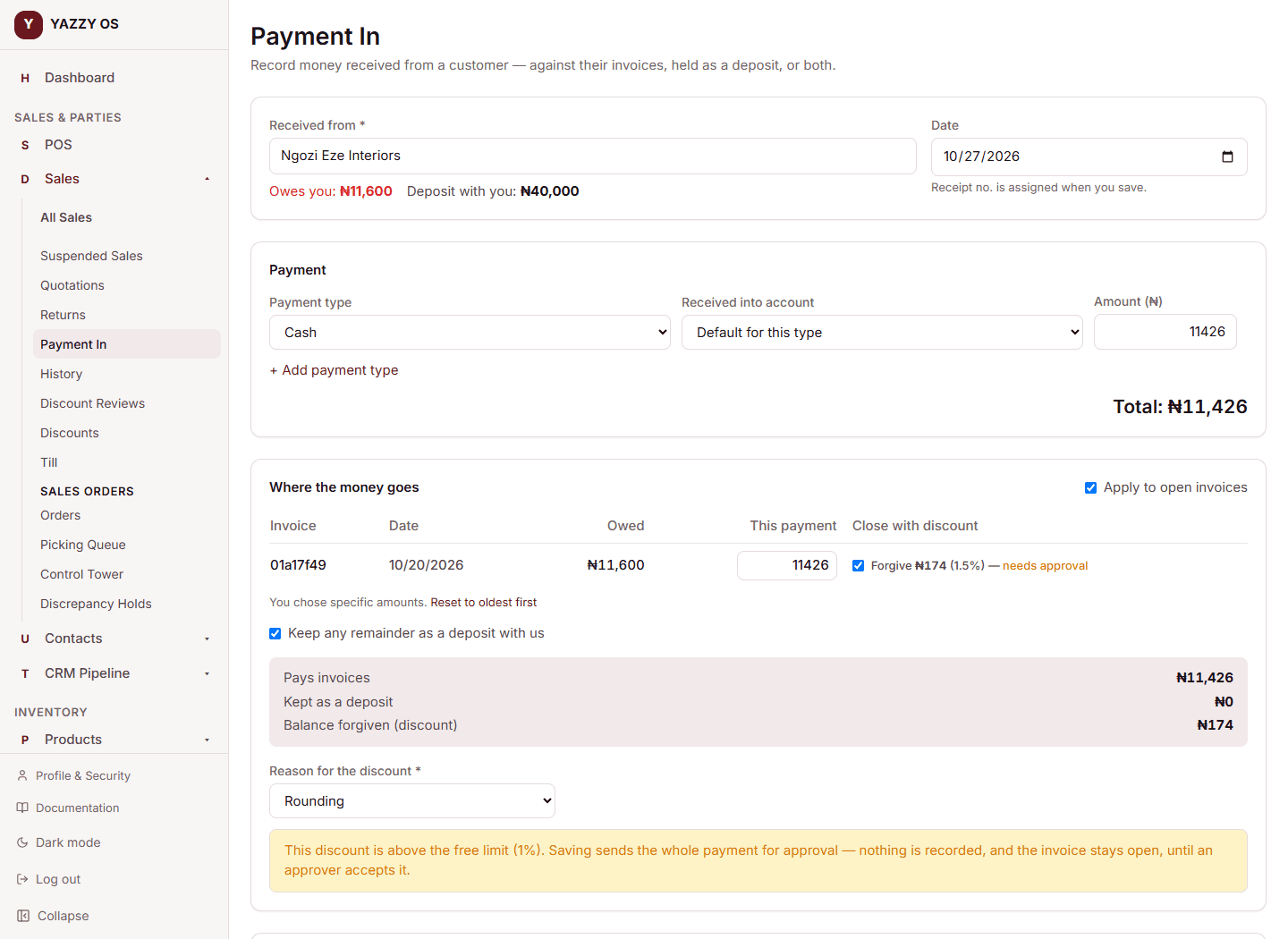
- If that leaves something owing, a Close with discount option appears on that row. Tick it.
- YAZZY OS shows what would be forgiven and what happens: Forgive ₦2,000 (2%) — posts at once, needs approval, or above the 5% maximum.
- Choose a reason: Rounding, Prompt payment, Goodwill, Dispute, or Other. Other needs a description in the note box.
- Select Save (or Send for approval).
The discount always closes the document — it forgives exactly what is left after this payment. You can't forgive part of a balance and leave the rest open, and you can't type a free amount. For a partial payment that leaves a balance behind, just record the payment normally.
The three limits
The limits are a percentage of that invoice's or bill's balance, and are separate for customers and suppliers.
| Customers (Payment In) | Suppliers (Payment Out) | |
|---|---|---|
| Free limit — posts immediately | 1% | 3% |
| Approval band — the whole payment is held until approved | up to 5% | up to 5% |
| Above the maximum — refused | over 5% | over 5% |
Those are the starting values. You can change them (below).
What "held for approval" means
If a discount is above the free limit, the whole payment is held — not just the discount. The receipt shows Awaiting approval and nothing is recorded: no money moves, the invoice or bill stays open, and no accounting entry is made. When an approver accepts it, YAZZY OS re-checks the invoice or bill against what it owes today and then records everything. If the document changed in the meantime (for example, it was paid another way), the approval is refused and the payment stays pending so it can be rejected. Rejecting changes nothing.
To approve or reject, open the receipt, or use the Settlement discounts list on Sales → Discount Reviews.
Changing the limits
Go to Roles & Permissions → Approval Thresholds → Add Threshold and choose:
- Customer settlement discount — free limit (%) and — maximum (%)
- Supplier settlement discount — free limit (%) and — maximum (%)
Enter the percentage and the role that approves the held payments (set on the free limit row). Set the free limit to 0 if you want every discount to need approval. If you set nothing, the starting values above apply.
Seeing what was forgiven
Sales → Discount Reviews has a Settlement discounts list: every receipt that forgave a balance, who it was for, how much, the reason and its status. The Payment In and Payment Out lists also show a Discount column, and each receipt prints the forgiven amount on its own line.
What it does to your books
- A customer discount posts Debit Discounts Allowed (an expense) / Credit Accounts Receivable. It shows in your Profit & Loss as an expense.
- A supplier discount posts Debit Accounts Payable / Credit Discounts Received (income).
- Only the money actually paid moves your bank or cash account.
- VAT is not adjusted. The whole forgiven amount goes to the discount account. If an agreed discount should reduce the VAT on the invoice, speak to your accountant about a separate adjustment.
A recorded discount can't be edited. To undo one, reverse the whole receipt.
What can't be discounted
Layaway sales that are still pending, foreign-currency bills, and deposit refunds can't carry a settlement discount.