Sell in cartons, packs or pieces
Pick the unit on each line of a sale, quotation or draft, and return goods in the unit they were sold in.
This guide assumes your company is on Option 2 and the item has a secondary unit — see Set up an item with two units.
Example: ABC costs ₦12,000 a carton, with 20 packs per carton and a pack price of ₦650. One customer wants 3 packs; the next wants 2 cartons.
At the checkout screen (till)
- Go to POS (the checkout screen).
- Pick the branch, the price group and the customer, as usual.
- Search for ABC and select it. It goes into the cart in its primary unit (carton) at the carton price.
- Under the item's name in the cart you will see a small unit box showing Carton. Change it to Pack.
- The price changes to the pack price (₦650, or ₦600 if you left the pack price blank) and the line total follows.
- If a price group is selected, the group's pack price is used.
- Type the quantity: 3. The line reads 3 Pack × ₦650 = ₦1,950.
- Take payment as normal.
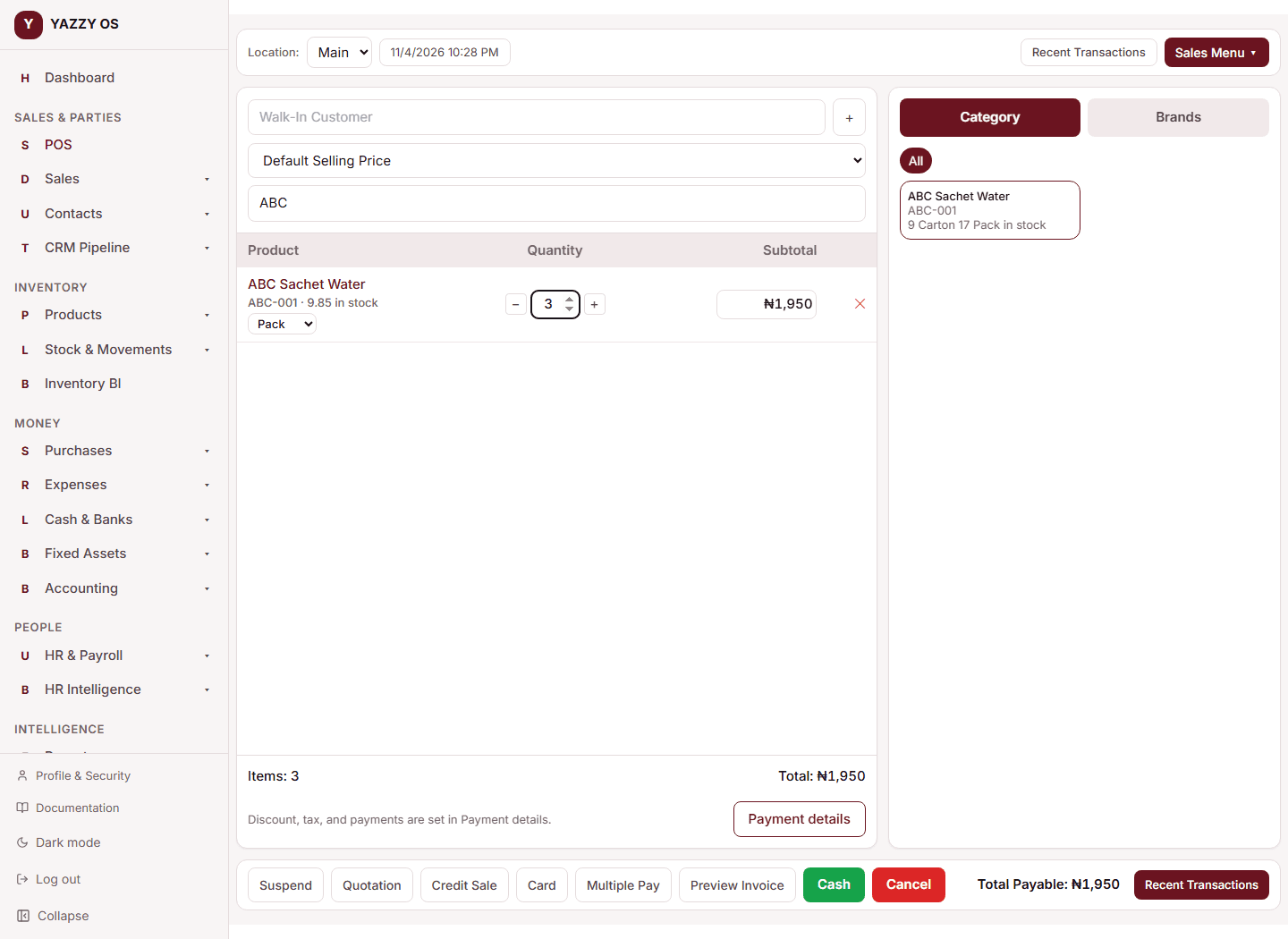
Behind the scenes the sale takes 3/20 of a carton from the one stock pool. If you started with 10 cartons, you now have 9.85 (shown as 9 Carton 17 Pack).
For the next customer, add ABC again and leave it on Carton with quantity 2. A carton line and a pack line for the same item stay as two separate lines in the cart.
Mobile app: the unit shows as tappable chips (Carton | Pack) under the item name. Tapping a product that has two units first asks which unit to sell in.
If the price cannot be looked up
If YAZZY OS cannot fetch the unit's price (for example a dropped connection), a warning appears — Couldn't look up the price for this unit — and the price is shown worked out from the conversion. Check it before you sell.
Typing a price by hand
Typing a different price for a line needs the Edit line subtotal / price permission, as always. A price you typed is kept when you switch units: it is scaled by the conversion.
On the Add Sale, Add Draft and Add Quotation pages
The same unit box sits beside the item name on every line. Choose the unit, then the quantity. Saving a draft or quotation keeps the unit you chose; when you reopen it for Edit or Resume it comes back as 3 Pack, not as 0.15 Carton.
What prints on receipts and invoices
Receipts, A4 invoices and PDFs show the line as you entered it: ABC (Pack) 3 650 1,950.
Returning goods
- Open the sale (Sales → All Sales → the sale, or go to POS → Returns).
- Select Sale Return.
- Each line shows what is left to return in the unit it was sold in: ABC (outstanding 3 Pack).
- Type how many to return — for example 1 pack.
- Add a reason and select Process Return.
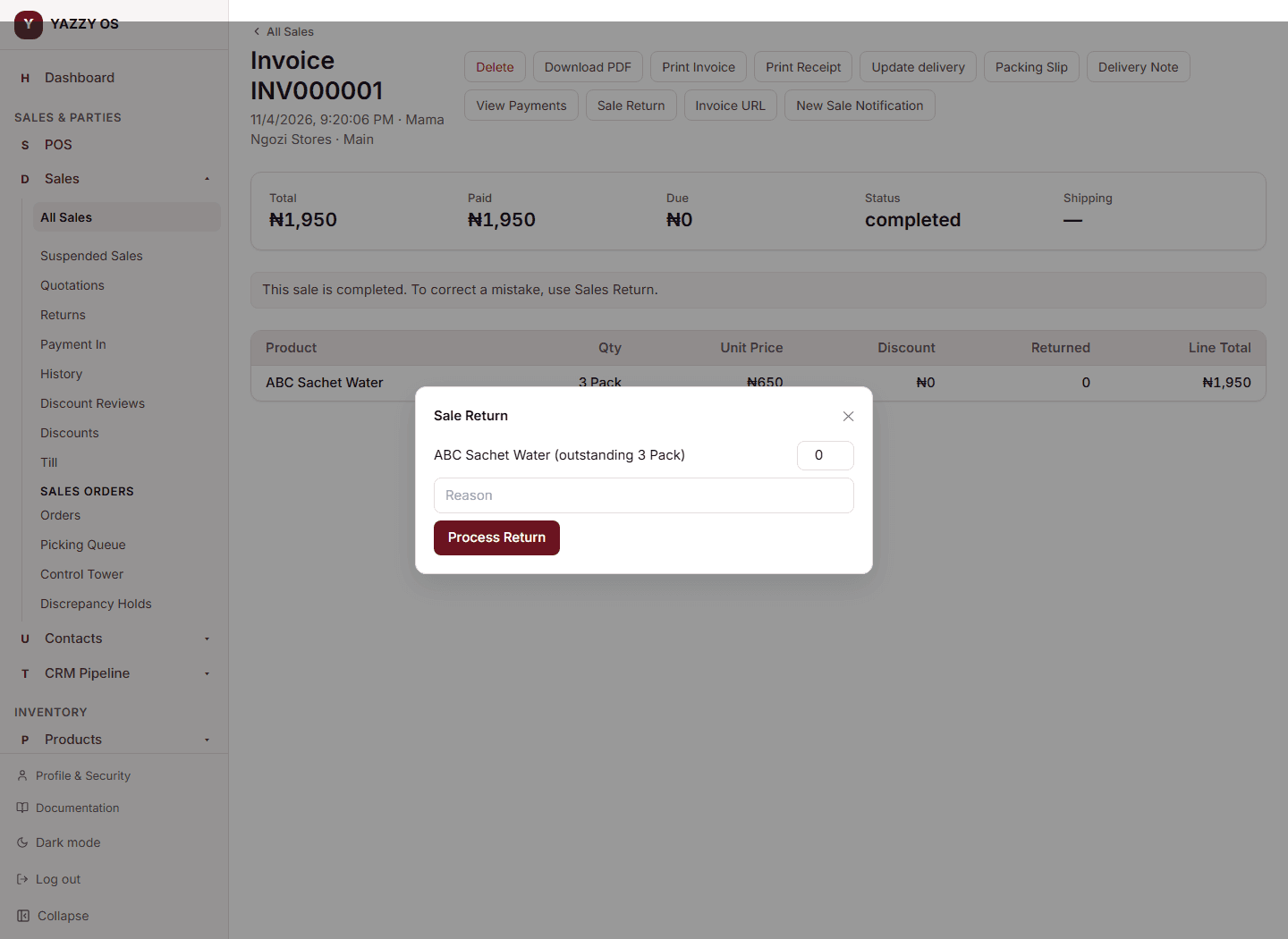
The refund is for the price the customer paid (1 pack = ₦650) and stock goes back as 0.05 carton. You cannot return more than was sold: asking for 4 packs when 3 were sold is refused. You can return the rest later; the last 2 packs bring the stock back to exactly the original figure, with no rounding drift.
Offline (Desktop app)
While the Desktop app is offline, items sell in their primary unit only (carton). A note on the checkout screen says so. Secondary units and option-barcode scanning work again as soon as you are back online. Sales made offline sync normally.
Sales orders
A controlled sales order reserves stock per product and works in the primary unit. Sell packs at the till or on a normal sale.