Compound products (kits and bundles)
Create a product made of other products, and understand how selling it uses up its parts.
A compound product is made of other products — a gift hamper (2 packs of rice + 1 bottle of oil + 1 tin of tomato), a wiring kit, a "starter bundle". You sell it as one item at one price, and YAZZY OS takes the parts out of stock for you.
A compound product holds no stock of its own. Its stock is always whatever its parts allow.
Create a compound product
- Go to Products and select New.
- Fill in the Name, SKU, Category and so on as usual.
- Set Selling Price to the price of the whole kit (for example ₦2,000). This does not have to equal the sum of the parts.
- Set Product Type to Compound (made of other products).
- Select Create Product. Do not enter opening stock; a compound product cannot hold any.
- The Parts of this compound product section appears. In the search box, type the name or SKU of the first part and select it from the list. Repeat for each part.
- Set the quantity of each part in one kit — for example 2 rice, 1 oil.
- Select Save parts.
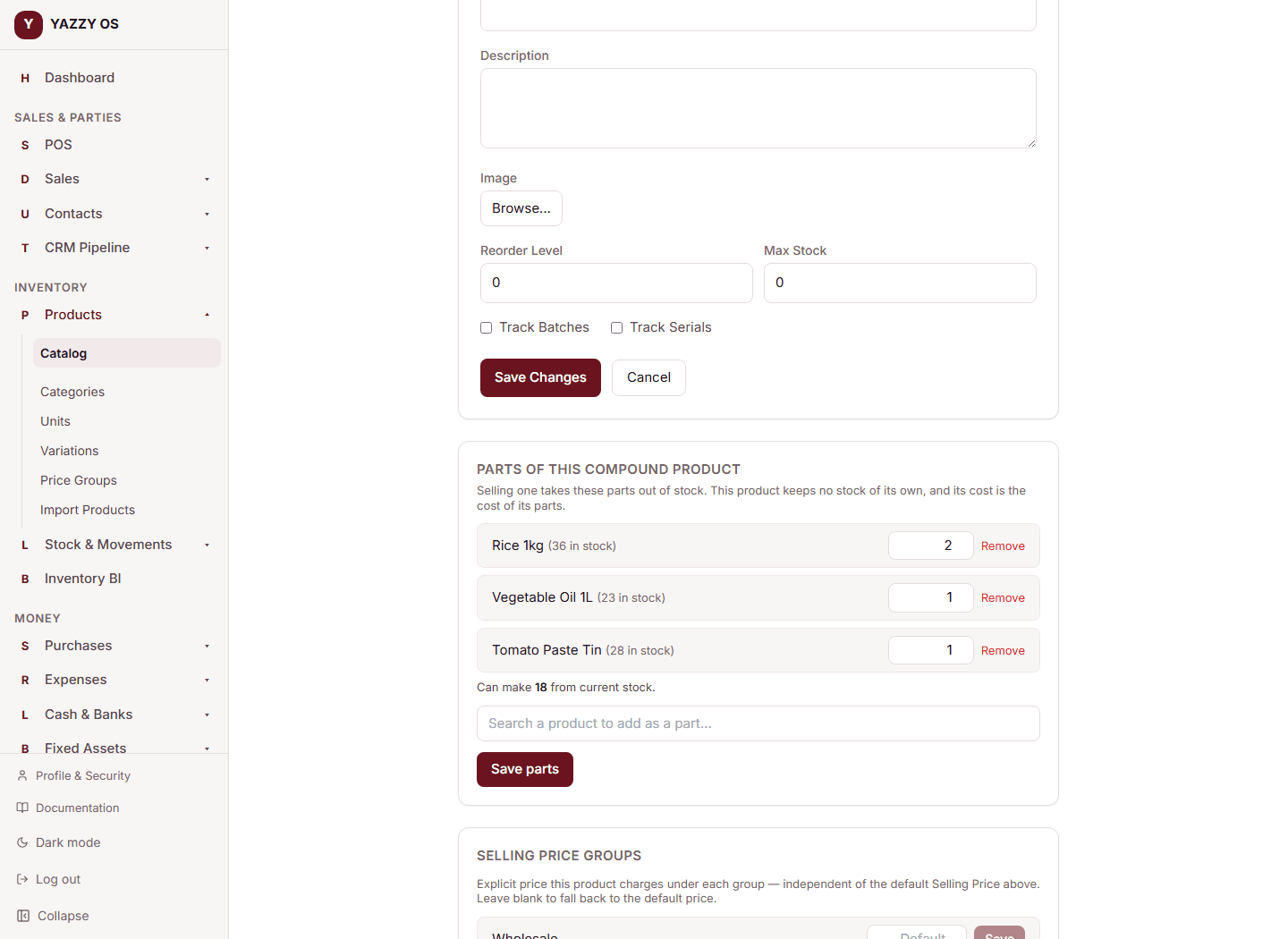
You will see Can make N from current stock under the parts: N is how many whole kits the scarcest part allows. Here 36 rice ÷ 2 per kit = 18, 23 oil ÷ 1 = 23 and 28 tomato tins ÷ 1 = 28, so you can make 18.
On the mobile app, open the product from Products and the Parts card is on its detail screen.
To change the parts later, open the product (Edit on Web and Desktop), change the quantities, remove or add parts, and select Save parts again.
Rules for parts
- A part must be an ordinary product. A compound product cannot be a part of another compound product (the save is refused).
- Each part needs a quantity above zero.
- On Option 1, part quantities must be whole numbers.
Selling a compound product
- At the checkout screen, search for the kit and add it. The tile reads made from parts instead of a stock figure.
- Set the quantity — for example 2 hampers.
- Complete the sale.
YAZZY OS takes 4 rice and 2 oil (and the rest) out of stock. The kit itself never shows stock. The cost of the sale line is the sum of the parts' costs at that moment (2 × ₦300 + ₦500 = ₦1,100 for one kit), so your profit reports stay correct.
When a part is short
If one part cannot cover the kits you are selling (you ask for 2 more hampers but only 1 oil is left), the whole sale is blocked and nothing is taken from stock. The message names how many items are short.
The Owner can let chosen people sell a kit anyway:
- Go to your role settings, open the role (or person).
- Under Sales / POS, tick Sell kits when a part is short.
- Save.
Anyone with that permission can complete the sale, and the part's stock goes negative so you can reconcile it later. Ordinary items still follow the company-wide allow selling below stock setting.
Returns
A sales return of a kit puts its parts back in stock: returning 1 hamper puts back 2 rice and 1 oil.
What a compound product cannot do
Because it holds no stock, a compound product cannot be:
- put on a purchase order, goods receipt or supplier bill (buy its parts)
- given opening stock, a stock adjustment or a stock transfer
- put on a controlled-workflow sales order, which reserves stock per product — sell kits at the till or on a normal sale
YAZZY OS refuses these with the message a compound product holds no stock of its own — its parts do.