Payment Out — paying a supplier or refunding a deposit
Record money you pay a supplier — against their bills, as a prepayment, or both — and pay a customer back their unused deposit.
Payment Out is where you record money leaving the business to a person you owe. Every payment gets its own numbered receipt (POUT000001, POUT000002, …).
It does two jobs:
- Pay a supplier — settle their bills, prepay them for goods you'll order later, or both.
- Refund a customer's deposit — give back credit a customer paid in ahead of time and didn't use.
Open it from Purchases → Payment Out.
Paying a supplier
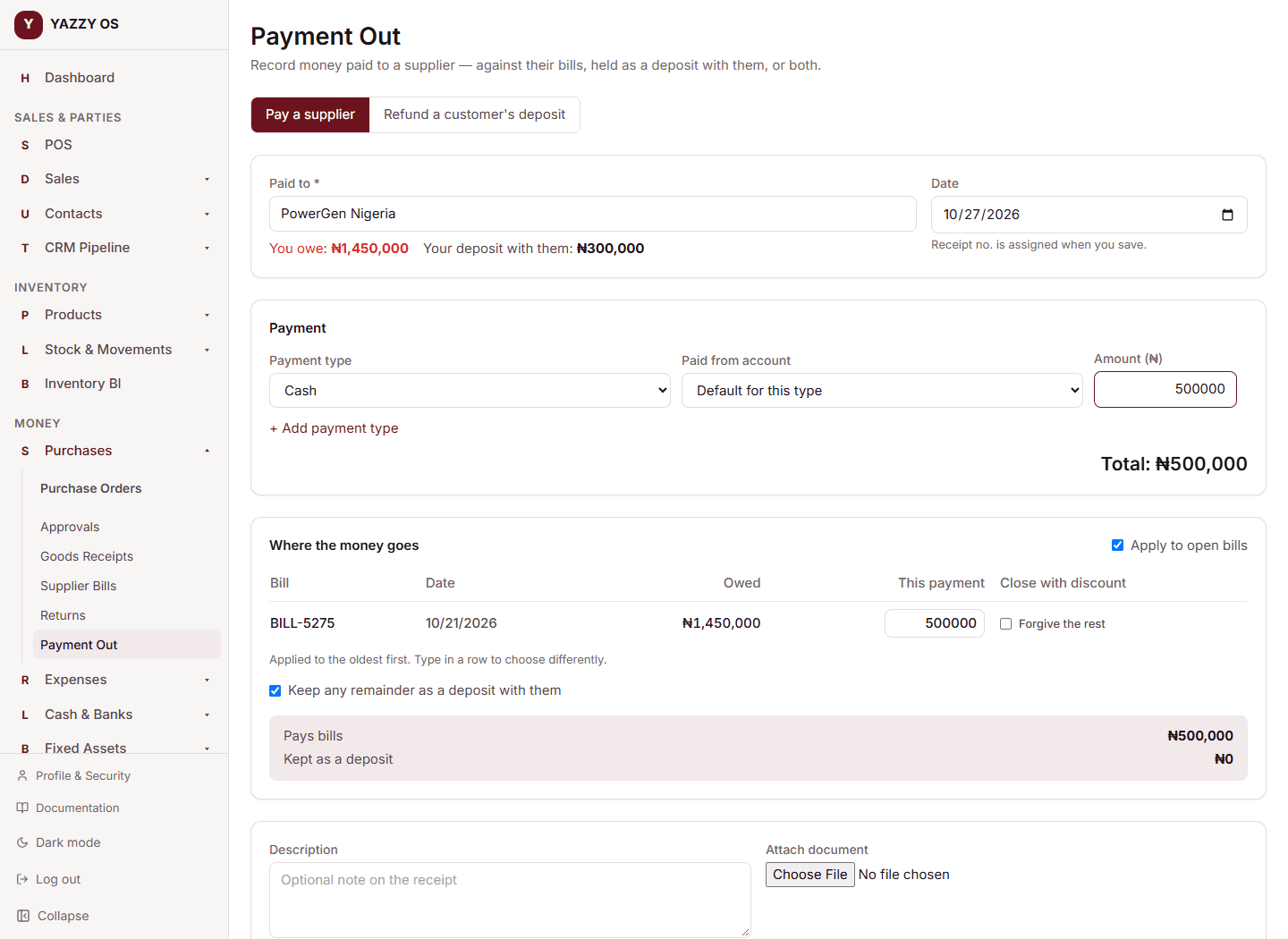
- Select + New Payment Out and keep Pay a supplier selected.
- Search for and select the supplier. Under their name you'll see You owe (their unpaid bills) and Your deposit with them (prepayments you've made that they haven't used yet).
- Choose the payment type, the account the money is paid from, and the amount. Use + Add payment type to split one payment across methods.
- Under Where the money goes:
- Apply to open bills pays their unpaid bills, oldest first, or the specific bills and amounts you type in.
- Keep any remainder as a deposit with them records the rest as a prepayment — money you've paid a supplier ahead of time. It sits as an asset (what they owe you in goods or credit), not an expense.
- Select Save.
Using a prepayment on a bill
A prepayment never applies itself. Open the supplier bill and select Link Payment, choose which prepayment to use (or leave it on oldest first), enter the amount and apply it. The bill shows Paid from deposit POUT000004, and no cash moves — it was already paid out when you made the prepayment.
Linking a prepayment to a bill is available on the web and desktop apps. The mobile app has no supplier bill screen yet.
When a supplier returns an unused prepayment
If a supplier gives back part of a prepayment, record it against their deposit. Cash comes back into your account and your deposit with them falls by the same amount.
Refunding a customer's deposit
When a customer wants their unused deposit back:
- On Payment Out, choose Refund a customer's deposit.
- Pick the customer. You'll see Deposit held for them.
- Choose the account to pay from and enter the amount — any amount up to the deposit they hold, not only the whole thing. The oldest deposits are refunded first.
- Select Send refund.
A refund is paid from one account, so use a single payment line.
Large refunds need approval
Refunds at or above your Deposit refund limit are not paid straight away. They are held as Awaiting approval: no cash leaves, and the customer's deposit stays exactly as it is, until someone with the approver role accepts it from the receipt or the list (Approve or Reject). Rejecting changes nothing.
Set the limit under Roles & Permissions → Approval Thresholds (type deposit_refund_amount). With no limit set, refunds go through immediately.
Reversing an advance payment from Advance Balance Management is the same cash-out, so it follows the same limit: above it, YAZZY OS asks you to use Payment Out → Refund so it can be approved.
Forgiving a small balance on a bill
If a supplier agrees to take slightly less than a bill's full amount, you can close the bill with a discount. See Settlement discounts.