Understanding your product catalog
A tour of the Products page — everything you sell, in one place.
Go to Products to see everything you sell.
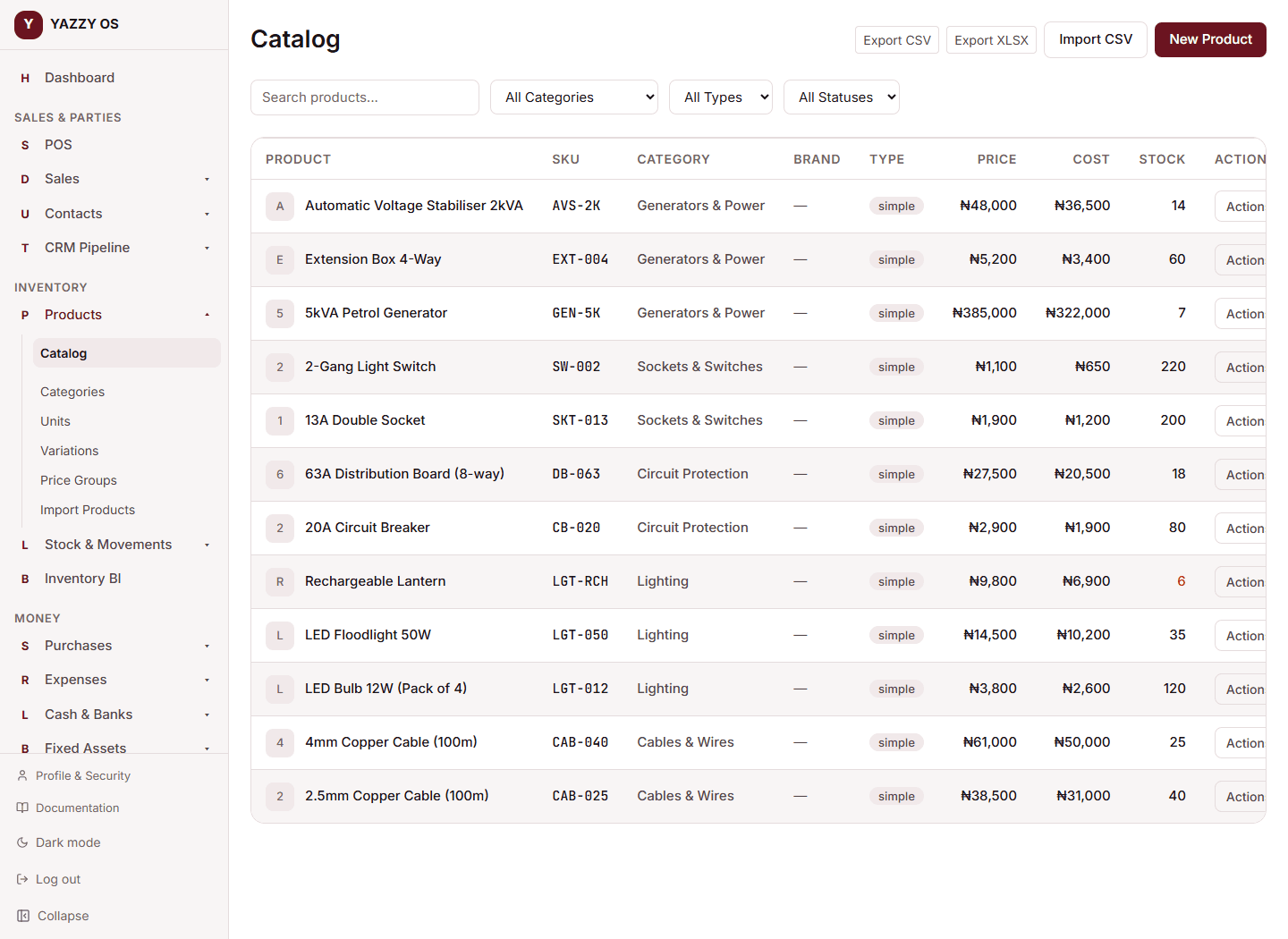
What's here
The main list shows every product with its SKU, price, and stock. From this page's menu you can also reach:
- Categories — group products (e.g. "Beverages," "Antibiotics") for easier browsing at checkout and in reports
- Labels — printable, scannable barcode labels for your products
- Price Groups — separate price lists like Wholesale, see Selling price groups
- Units — the units of measure your products are sold in (each, box, kg, etc.)
- Variations — templates for products that come in multiple options, like Size or Color, see Adding a new product
Searching
The search box on the Products page matches against a product's Name, SKU, Barcode, Brand, and Description — so you don't need to know the exact branded name to find something. If your product descriptions include the generic or active-ingredient name (e.g. a description of "Ciprofloxacin 500mg" on a product branded "CIPROTAB"), searching that generic name finds it too.
Opening a product
Select any product in the list to see its full detail page — its price, cost, description, stock at each of your branches, and (for a variable product) its individual variations.
Adding many products at once
Instead of creating products one at a time, you can import a whole batch from a spreadsheet — see Importing products from a CSV file. The page also has an Export button if you want your current catalog as a spreadsheet.